Showing posts with label Laptops / Notebooks. Show all posts

BenQ Launches 10.1-inch Netbook in Taiwan and China


BenQ has decided to release its new Joybook Lite U101 netbook in Taiwan and China. The netbook features a 10.1 inch display with LED backlight and a 16:9 aspect ratio, which is good for watching movie. The BenQ Joybook Lite U101 is now available in Taiwan and will be released in China this week. Unfortunately, its price tag is still unknown. [Digitimes]

Asus N10J Gaming Netbook


Asus has recently released the new Atom-powered netbook that can run video games. The Asus N10J is a 10-inch netbook that is powered by an Intel Atom N270 CPU with 1GB of RAM, and Microsoft Windows XP. What makes the N10J special is that it comes equipped with the Nvidia GeForce 9300 graphics card so you can still play the Unreal Tournament III on this netbook. The new Asus N10J netbook is priced at £455. [Crave]

Kouziro Frontier Netbook


Kouziro Frontier comes back with its latest netbook known as the FRNU302/BK. You can bring home this netbook for around. The basic configuration comes equipped with a 10.1 inch LCD display, 1GB RAM, Intel Atom N270 processor and 160GB hard drive. Youcan also choose between Microsoft Windows XP (Home or Professional) or with Windows Vista Home Premium as the operating system. Can you imagine Windows Vista on a system with only 1GB RAM? It is not enough, right? [EeePC]

Gigabyte M912x GoldenRod


Gigabyte has released the newest version of Gigabyte M912x TabletPC dubbed Gigabyte M912x GoldenRod. The specs are a 8.9-inch touchscreen with 1280 x 768 resolution, Intel 945GSE chipset, 1.6 GHz Atom processor, 1 GB od DDR2 RAM, 160 GB of HDD, weigh 1.3 kg, 4500 mAh Lithium-ion battery, Other features should include 1.3 MP camera, Epress card slot, three USB 2.0 ports, 3-in-1 card reader, Bluetooth 2.0 support and Wifi b/g as well as ethernet LAN, it is also comes with Microsoft Windows XP Home OS. [Lifeatmost]

New MSI Wind Netbooks in France


MSI has released three new MSI Wind models in France. The new variants including the MSI Wind U120 with HSDPA or 3.5G support, Wind U110 and Wind U115. The MSI Wind U110 comes equipped with Atom Z530 CPU with 1GB RAM, Intel SCH-US15W Intel chipset, integrated graphics, a 10 inch 1024×600 display, 120 to 250GB SATA HDD, Flash card reader, 6 Cell battery (rated 8-10hrs), WIFI B/G/N, and a 1.3MP webcam.
The MSI Wind U115 offers the same specification except Atom Z530 CPU, up to 2GB RAM, HDD or up to 32GB SSD, and supports Bluetooth 2.0 EDR. [Netbook3G]

Jointech J-Pro JL7100 $99 Mini Laptop

Jointech has just announced what could be the cheapest mini laptop selling at only $99. JL7100 runs on Win CE 5.0. It uses Samsung chipset with 64 MB RAM and internal memory of 64 MB. It also has built in Wi-Fi and 3 USB Ports (which you can also use to plug external memory). It is capable to run basic laptop applications like MS Word, MS Excel, media player, MSN messenger, PDF reader, Internet Explorer, and more. All these packed in 225 x 165 x 36 mm accessible through 7″ display, weighing only 680g. The only catch is that it is currently only selling in Hong Kong. [Jointech]

Sony VAIO FW 16.4 Inch Laptop


NotebookReview has a comprehensive review of the Sony’s VAIO FW. Priced at $2,149, the laptop features a 16.4 inch LCD screen (1600 x 900), Intel Core 2 Duo T9400 (2.53GHz, 1066MHz FSB, 6MB Cache) with 256MB ATI Mobility Radeon 3470, 4GB RAM, 320GB HDD (5400rpm), Wi-Fi and webcam. Other specs are include 4400mAh Li-Ion Battery. The new Sony VAIO FW measures 15.12inch x 1.14inch x 10.27inch and weights 3.1kg.


Here is a verdict.
System performance is one category that this notebook really shines. Even with a 5400rpm hard drive, the notebook performed quite well throughout various activities including watching Blu-ray movies, playing a few games, and installing applications. The Intel Centrino 2 platform no doubt had a hand in this, and gave us some impressive performance benchmarks. PCMark05 was into the 6,000 range and 3DMark06 was around 2,600.

Lenovo G430 Sneak Peek


More of G430 specifications have been revealed as follow. CPU of Intel Core 2 Duo processor at 2 GHz clock with 160 GB hard disk. Optical storage DVD Super Multi (DVD + /-RW, DVD-RAM) standard memory accessible through 14-inch display screen with NVIDIA Geforce 9300M GS of 256 MB. G430 weighs approximately 2.4 Kg. [CNET]

Fujitsu U2010 Menlow Notebook


The Fujitsu U2010 small laptop is powered by a new Intel Menlow platform. Weighing 610grams, the UMPC offers 1,280 x 800 resolution LCD display, a fingerprint reader and dual memory card slots. Its battery provides only 3.5 hours so you need to turn of Wi-Fi, lower the screen brightness to increase battery life. Fujitsu U2010 Menlow Notebook retails for HK$1350. [UMPCPortal]

Installing RAM in your Laptop

This guide was developed to instruct readers on the proper procedures for installing memory modules into a laptop computer. It includes step-by-step instructions for the physical installation of a memory module into those laptop systems that have an access panel to the memory modules. Not all laptops have this type of access. If yours does not, then it will probably require installation from an authorized technician.

For additional information about installing computer memory into your computer system, it is recommended that you read any user manuals that came with your computer for specific procedures that may be required. For more information for purchasing memory upgrades for a computer, please refer to the Before You Buy Memory upgrades article.

1. Turn off the computer and remove all power cords from the computer system.

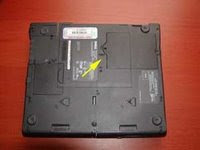
2. Locate the panel used for access to the memory modules. This is generally located on the bottom of the laptop computer. Refer to your laptop instruction manuals for locating the panel.

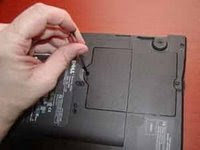
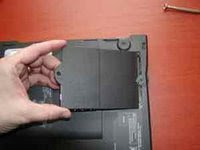
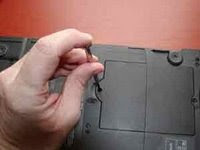
3. Remove any screws that the panel in place and place somewhere safe to prevent losing it.

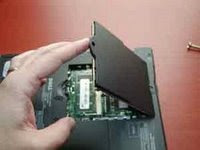
4. Remove the panel from the laptop and set aside.


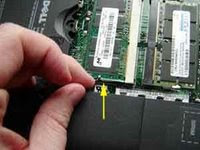
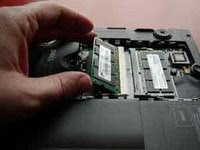
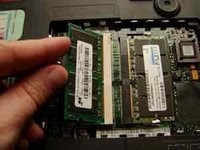
5. If replacing or upgrading an existing memory module, remove the memory modules by undoing and module clamps and gently lifting the edge of the module to a 45-degree angle and then pulling the module out of the slot.


6. Align the notch of the memory module with that of the memory slot and gently insert the module into the slot at a 45-degree angle.


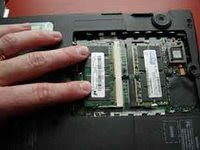
7. Once all the pins are in the slot, gently rotate the module down flat until the clamps lock into the module into place.


8. Replace the memory access panel onto the laptop computer.


9. Replace any screws or fasteners that hold the panel in place.


10. Replace the power cord and power up your computer system.

Once the memory has been installed into the computer, the physical process is complete. When the computer is powered back up, it may be necessary to go into the computer BIOS to let the system properly detect the new RAM that has been installed in the computer.

Installing memory by your own is quite simple but risky. Don't do it if you are not really sure about it. Sometime it is better to let an expert to do it for you. It may cost you to buy a new laptop if you're reckless ;p
Please refer to the user manual for the computer system for any additional information.

Few Things to Consider Before Purchasing a Laptop Computer

OK, you wanna buy a laptop and have the money, but before you start to waste it for something you dont actually need and regret it for sure (believe me, i know) maybe you need to read this before.

This are few things you need to consider before you decide to buy a laptop :

1. Portability - The main reason to have a laptop or notebook computer is portability - the need to take your entire computer from one place to another. If you don't need portability, then you should probably buy a desktop.

2. Expense - Laptop computers cost almost twice as much as comparably equipped desktops. Shocking isn't it?You can actually buy two comparably equipped desktops for the price of one laptop. So if you have to have a computer in two separate places, you would be better off with two desktops (if they were reasonably close together you could hook them together in a wired or wireless local area network (LAN).

3. Speed - Laptops are 20-30% slower than a desktop with the same features (CPU, hard drive capacity, etc.). Slower CPUs, motherboards, hard drives, and video systems all contribute to the speed loss.

4. Upgradeability - Laptop computers are mostly non-upgradeable. Whatever CPU, video card (built into the motherboard), sound card (also built-in), and screen, that come with the laptop are the same parts the laptop will end with. While it is possible to upgrade main memory, and removable drives, the upgrades can cost twice as much as a desktop's. Upgrades using PC cards or docking stations are also very expensive.You can also upgrade newer laptops through their USB, USB 2.0, and Firewire ports. Only USB 2.0 and Firewire ports can run high speed devices e.g. hard drives and DVD drives. Again, all external drives cost almost twice as much as an internal drive.

5. Serious Gaming. You will need to spend at least $2500 for a laptop that can play current games at a respectable speed. I don't recommend laptops for serious gaming no matter how much you are willing to spend. Why? Because if you love to play games, about 1-1.5 years after you purchase your laptop you will find it isn't fast enough to keep up with the latest new game. At that time, you will regret buying a gaming laptop. However, if you have the money, and want to throw down $2500 every year or so, more power to you. On the other hand, if your computer budget is limited, it's better to have a functional laptop and spend your gaming dollars on an upgradeable desktop.

Hope this little stuff will help you to decide to buy a laptop or change your mind and buy a desktop computer instead.

Regards,
Sabrinna

Recent Comments

Partner Site :

Critics, Comments, Suggestion, Concerns

Computers Science Desktop PCs Laptops / Notebooks Network Internet Maintenance and Troubleshooting Cool Windows Guide, Tips and Tricks PC Games
Add to Technorati Favorites Top Blogs blogarama - the blog directory Computers Computers blogs Hardware Blogs - Blog Catalog Blog Directory
Search Engine Optimization and SEO Tools
Template by KangNoval & Abdul Munir | blog Blogger Templates